

Unlock with Your Unlock Key
 If you received an error message when you tried to unlock the software,
see Solving Unlock Errors.
If you are running Windows Vista, Windows 7, Windows 8, or Windows 10, or if you are running 2000 or XP Pro without administrative privileges,
you must run the program as an administrator.
If you received an error message when you tried to unlock the software,
see Solving Unlock Errors.
If you are running Windows Vista, Windows 7, Windows 8, or Windows 10, or if you are running 2000 or XP Pro without administrative privileges,
you must run the program as an administrator.
- Right click on the program's desktop icon or the program's shortcut on the Windows Start menu.
- Select Run As the Administrator (or an account with administrative privileges).
The trial (or demo) version of Yadu Digital software is turned into a licensed copy without time restrictions by the entry of your name, a Customer ID, and an Unlock Key.
Some software additionally requires your company name.
To unlock your registered software, follow these steps:
Step 1 Start the program.
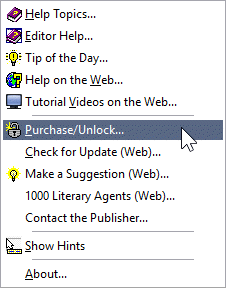
On the sign-on screen, click on the 'Unlock' button; or in the program,
choose 'Purchase/Unlock' from the main menu's Help submenu, as shown here.
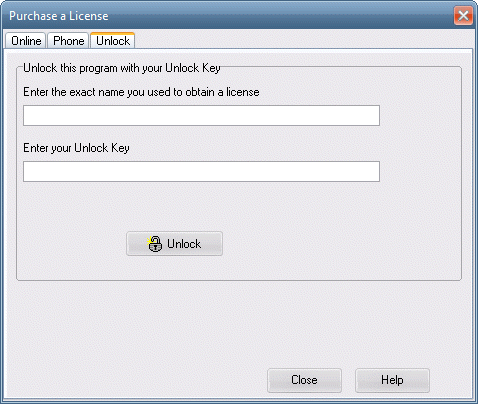
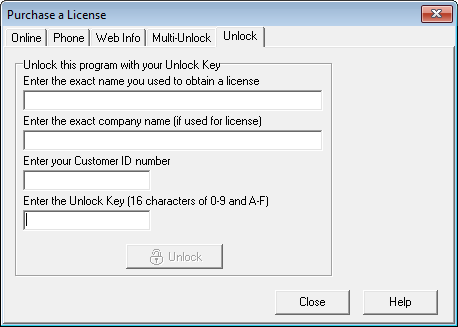
Step 2 Choose the 'Unlock' tab from the notebook dialog that appears.
Writer's Desk unlock page
Finders Keepers unlock page
Step 3
Enter your name, your company name if it was used for the license, your Customer ID, and your Unlock Key.
3-A Enter the exact name you used to obtain a license
Enter the name that you used when you filled out the order form on the Internet or called in your order for a license. The entry is not case-sensitive, but it must be exact.
3-B Enter the exact company name (if used for license)
Enter the company name that you used when you filled out the order form on the Internet or called in your order for a license. The entry is not case-sensitive, but it must be exact. Leave this blank if no company name was used for licensing.
NOTE: Your software may not have an entry field
for a company name. If that is the case, your software does not use a company name for unlocking.
3-C Enter your Customer ID number (if you have a version that asks for it)
When you purchased your license, you were given a Customer ID number. If you ordered online, your Customer ID was displayed in an online receipt and it was emailed to you. Enter that number.
NOTE: Your software may not have an entry field for a Customer ID. If that is the case, your software does not use a Customer ID for unlocking.
3-D Enter the Unlock Key (16 to 32 characters of 0-9 and A-Z)
At the time of purchase, you were given an Unlock Key consisting of 16 or 32 characters.
If you ordered online, the Unlock Key was displayed in an online receipt and it was emailed to you.
All characters in the Unlock Key are either numerical digits or letters, for example, 7420 B261 92F5 C447 or HFGBU1 KM7GXK 31QGK5 ZUBCJT F4A147 4JA7UK.
Enter that Unlock Key.
Step 4 When your entries are complete, click the 'Unlock' button. A pop-up message will tell you whether the unlocking was successful or not. If it was not, check your entries for accuracy and try again.
If you received an error message when you tried to unlock the software, see also Solving Unlock Errors.
MORE HELP:
If need additional help, start up the software and press the F1 key in the area where you need the help. The F1 key also pops up help when you have a menu item selected (highlighted). If you need more help, please contact us.
Copyright © 2024 YaduDigital.com All rights reserved